
Before designing a new website, gather the information customers need to decide whether your business is right for them. Start with your services, practical details, genuine proof and a clear next step. You do not need polished copy for every page before the first conversation, but you do need reliable facts.
For an independent business in Leamington Spa, Warwick or the wider Warwickshire area, a useful content pack can make the difference between a website that looks finished and one that is ready to help customers.
Start with the questions customers already ask
Write down the enquiries you answer repeatedly. What do people ask before booking, visiting or requesting a quote? What information do they need before you can give a useful answer?
A salon might need to explain appointment types. A landscaping business might need to show the kinds of projects it accepts and where it works. These are illustrative examples; your own customer conversations should shape the list.
GOV.UK’s content guidance starts with user needs and tasks. A small business can apply that principle by giving each proposed page a clear purpose. “Help someone choose the right service” is more useful than “have a services page because other sites do”.
Prepare one clear summary for each main service
For every priority service, note who it is for, what is included, what is outside the scope and what happens next. Add the questions people need answered before they contact you.
If prices depend on the project, explain which details you need to prepare a quote. If you offer a fixed package, confirm the current inclusions and any conditions before the copy is written.
Keep this practical. A prospective customer needs to understand the offer before reading about your ambitions as a business. Your designer can help turn those facts into an approachable page structure.
Make local details accurate and useful
Confirm the business name, telephone number, monitored email address, opening times and service area. For premises customers can visit, prepare the address and useful arrival information.
Include parking or accessibility information only when you can verify it. Explain whether appointments are required and whether the published hours describe opening, telephone availability or something else.
For a business that travels to customers, list the areas genuinely covered and explain any restrictions. A long list of town names does not replace a clear service description. Do not imply that you have premises in every place you serve.
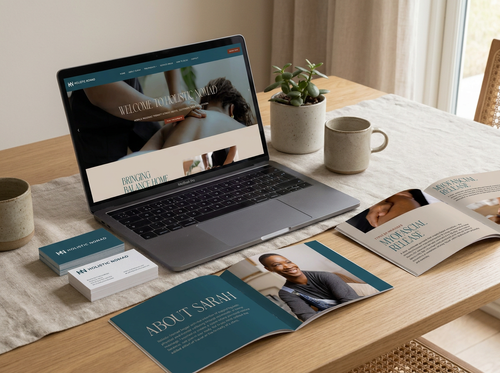
Holistic Nomad project mock-up from our portfolio: website content and supporting materials working together.
Gather proof you are comfortable publishing
Collect a small selection of relevant projects, photographs and approved testimonials. Note what each example demonstrates and which service it belongs with.
A project description can explain the customer's need, the work supplied and the finished result without claiming an increase in sales you have not measured. If a photograph or testimonial needs permission, flag that before it reaches the website.
Keep the original files where possible. A screenshot copied from social media may be too small for a large page image, and it can contain unnecessary interface elements.
Give each image a job
Choose photographs that help someone understand the business: the team they will meet, a relevant finished project or the product being discussed. Keep a note of the source and permission alongside each file.
The W3C’s image guidance distinguishes meaningful images from purely decorative ones. Alt text should convey relevant information or function; decorative images generally need an empty alt attribute. Describe the image in its page context, rather than filling the field with location keywords.
Do not put essential opening times or service information only inside an image. Supply those details as editable text too, so they can be maintained and presented clearly.
Organise a simple handover
Create one folder with a document for each main page and a separate image folder. In each document, name the person responsible, record the latest review date and label anything still awaiting confirmation.
For example, a service-page handover might contain: the customer question, service summary, three common questions, two approved photographs and the preferred enquiry action. That is enough to begin a focused design discussion without pretending every word is final.
Keep access details out of these content documents. Agree account access through the relevant platform when it is needed.
Decide who keeps the site current
Before launch, assign responsibility for prices, hours, team details and new work. Make sure the handover includes an explanation of how those items are edited. A website is easier to maintain when that responsibility is clear from the start.
Bear Design Studio provides website design for businesses in Leamington Spa and Warwickshire. Tell us about your website project, what is already prepared and where you need help. Rough notes and honest gaps give us a useful starting point.